
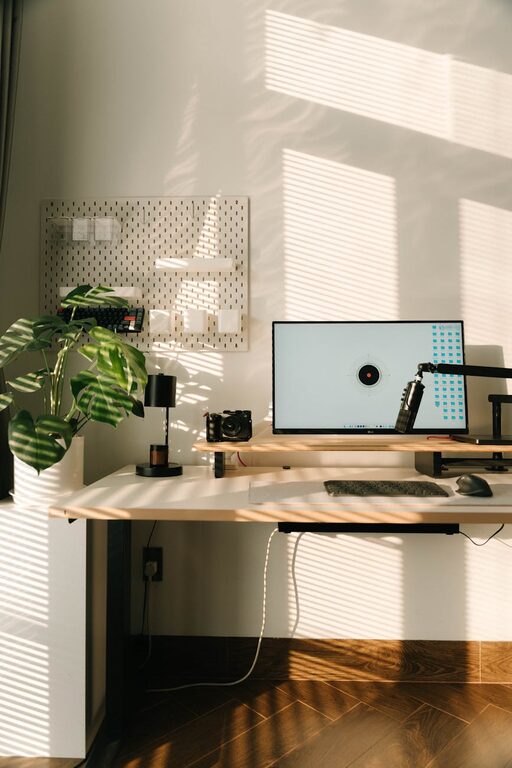
Creating a home office that feels welcoming and organised can significantly improve your productivity and overall work experience. Whether you are new to working from home or looking to refresh your current setup, this guide offers practical tips to help you design a space that is both comfortable and efficient.
Choose the Right Location
Selecting the ideal spot for your home office is the first step. Consider the following:
– Natural Light: Position your desk near a window to enjoy natural daylight, which can enhance mood and reduce eye strain.
– Quietness: Find a space away from household noise and distractions if possible, to maintain focus during work hours.
– Space Availability: Ensure there is enough room for your desk, chair, and any equipment you need without feeling cramped.
Invest in Comfortable and Functional Furniture
Your office furniture affects both comfort and productivity. Prioritise the following:
– Ergonomic Chair: Choose a chair that supports your posture to prevent discomfort during long work sessions.
– Adjustable Desk: If possible, opt for a desk with adjustable height to allow standing or sitting postures.
– Storage Solutions: Desks with drawers or built-in shelves help keep essential items close and reduce clutter.
Keep Your Space Organised
Organisation is key to maintaining a neat and efficient workspace. Here are practical ideas:
– Use Desk Organisers: Trays, pen holders, and file sorters can keep small items tidy.
– Cable Management: Use clips or cable trays to avoid tangled wires and keep surfaces clean.
– Declutter Regularly: Set aside time weekly to clear out unnecessary documents or materials.
Personalise Your Environment
Making your office a pleasant place encourages motivation. Consider:
– Add Plants: Small indoor plants can improve air quality and add a touch of nature.
– Decorate Tastefully: Display a few personal items like photos or artwork to make the space inviting without overcrowding.
– Choose a Calming Colour Scheme: Soft colours can promote concentration and calmness.
Optimise Lighting
Proper lighting reduces eye strain and creates a welcoming atmosphere.
– Layer Lighting: Combine natural light with overhead fixtures and a desk lamp.
– Use Adjustable Lights: A lamp with adjustable brightness allows you to tailor the lighting to your needs.
– Avoid Glare: Position screens perpendicular to windows to minimise reflections.
Create Zones for Different Tasks
If your space allows, divide your office area into zones such as:
– Work Zone: Desk and computer for focused tasks.
– Reference Zone: Bookshelves or filing cabinets for documents.
– Relaxation Zone: A comfortable chair or small sofa for breaks and informal reading.
Keep Technology Updated and Organised
A functional tech setup supports efficiency.
– Manage Devices: Use stands and holders for laptops, tablets, or phones.
– Keep Software Organised: Regularly update your software and consider apps that help with task management.
– Have a Charging Station: Designate a spot for charging devices overnight or during the day.
Maintain Good Air Quality and Temperature
Comfort is more than just furniture.
– Ventilation: Open windows when possible or use an air purifier.
– Temperature Control: Use fans or heaters to maintain a comfortable working temperature year-round.
Establish a Routine for Tidying Up
Building a habit of keeping your workspace organised helps sustain its welcoming nature.
– End-of-Day Clean Up: Spend 5 to 10 minutes tidying your desk and organising papers.
– Weekly Deep Clean: Dust surfaces, vacuum floors, and straighten shelves regularly.
Final Thoughts
Designing a welcoming and organised home office doesn’t need to be complicated. By paying attention to layout, furniture, lighting, and clutter management, you can create a space that supports your productivity and wellbeing. Remember, the best home office is one that suits your personal work style and makes you feel motivated to tackle the day’s tasks.